Client Gallery Delivery Playbook
Commercial Workflow: When visuals drive revenue, sharing must be structured, traceable, and easy for clients to consume.
What matters first
Before publishing, decide exactly what this link is for—review, handoff, delivery, or archive reference. That one decision makes the experience clearer for recipients and easier to manage for you.
Quick fact check: one link supports up to 25 images; the same URL can be turned into a QR code; you can define open limits and validity period; and you can disable the link instantly.
Execution plan
1) Build a compact share set
- Include only the files needed for this decision or handoff.
- Keep the order easy to follow (cover → key shots → details).
- If you need more than 25 images, split by scenario instead of packing everything into one link.
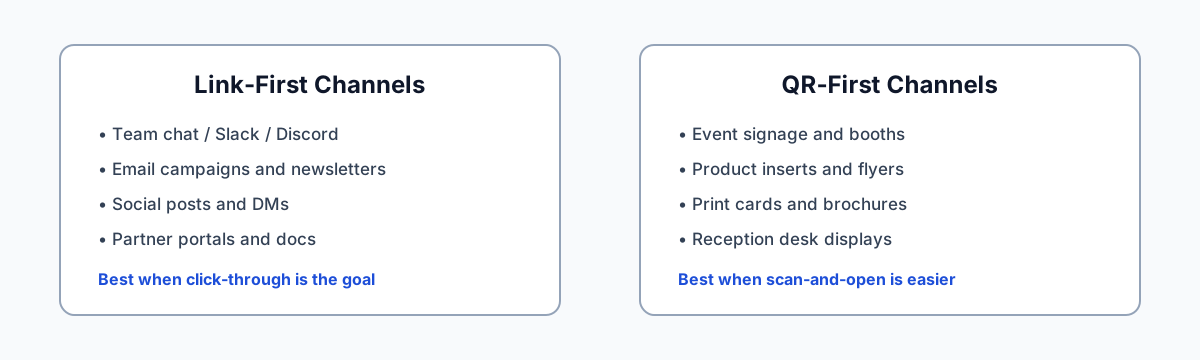
2) Match channel to context
- Use direct URL in chat, email, docs, and social captions.
- Use QR codes in physical touchpoints: slides, posters, cards, booths, and packaging.
- Use short, human labels so people immediately know why they should open it.
3) Apply controls before distribution
- Package image sets by product, room, model, or campaign.
- Send direct links in email/chat and add QR for print materials.
- Keep each share scoped and retire links after delivery confirmation.
Visual workflow

Quick operating checklist
- Confirm objective and recipient list.
- Package images (max 25) with clear ordering.
- Create link and QR from the same source URL.
- Set open count and expiry based on your timeline and distribution needs.
- Send, run a quick distribution review, and disable access when the task is complete.
If one line explains your share, people open it faster. Keep the promise clear and the set focused.